

A context window is the amount of information an AI model can take into account while processing a request and generating a response. It is usually measured in tokens and can include your latest prompt, relevant conversation history, instructions, uploaded material, tool results, and—in many systems—the response the model generates.
Think of it as the model’s active working space for a particular interaction. A larger context window can let a model work with longer documents or more conversation history at once, but it does not mean the model remembers everything permanently or will use every detail perfectly.
Context windows matter when you use AI chatbots, analyse long PDFs, work with code repositories, build AI agents, or send requests through an API. Understanding them helps you avoid context limits, organise long tasks, and choose the right strategy for summarising or retrieving information.
This guide explains what an AI context window is, what uses its capacity, how it differs from memory and training data, why long context can still fail, and practical ways to manage it.
For related concepts, read our guides to AI tokens, large language models (LLMs), and transformer models.
What is a context window in AI in simple words?
A context window is the limited amount of information a model can reference during a request. It is often described as the model’s working memory for that interaction, measured in tokens rather than pages or words.
For example, imagine asking an AI assistant to summarise a long report. The system may need to include your instructions, the report text or selected sections, relevant conversation history, and space for the summary it generates. All of this must fit within the limits of the model and application being used.
The context window is different from the much larger collection of data used to train a model. Training shapes the model’s parameters before deployment; context is the information supplied or made available to it while handling the current request. Anthropic explains this distinction in its official guide to context windows.
How does an AI context window work?
Text is converted into tokens before many language models process it. A request is represented as a sequence of these tokens, and the model uses the available context to generate its output. Depending on the product and task, the context can contain more than the words typed into the chat box.
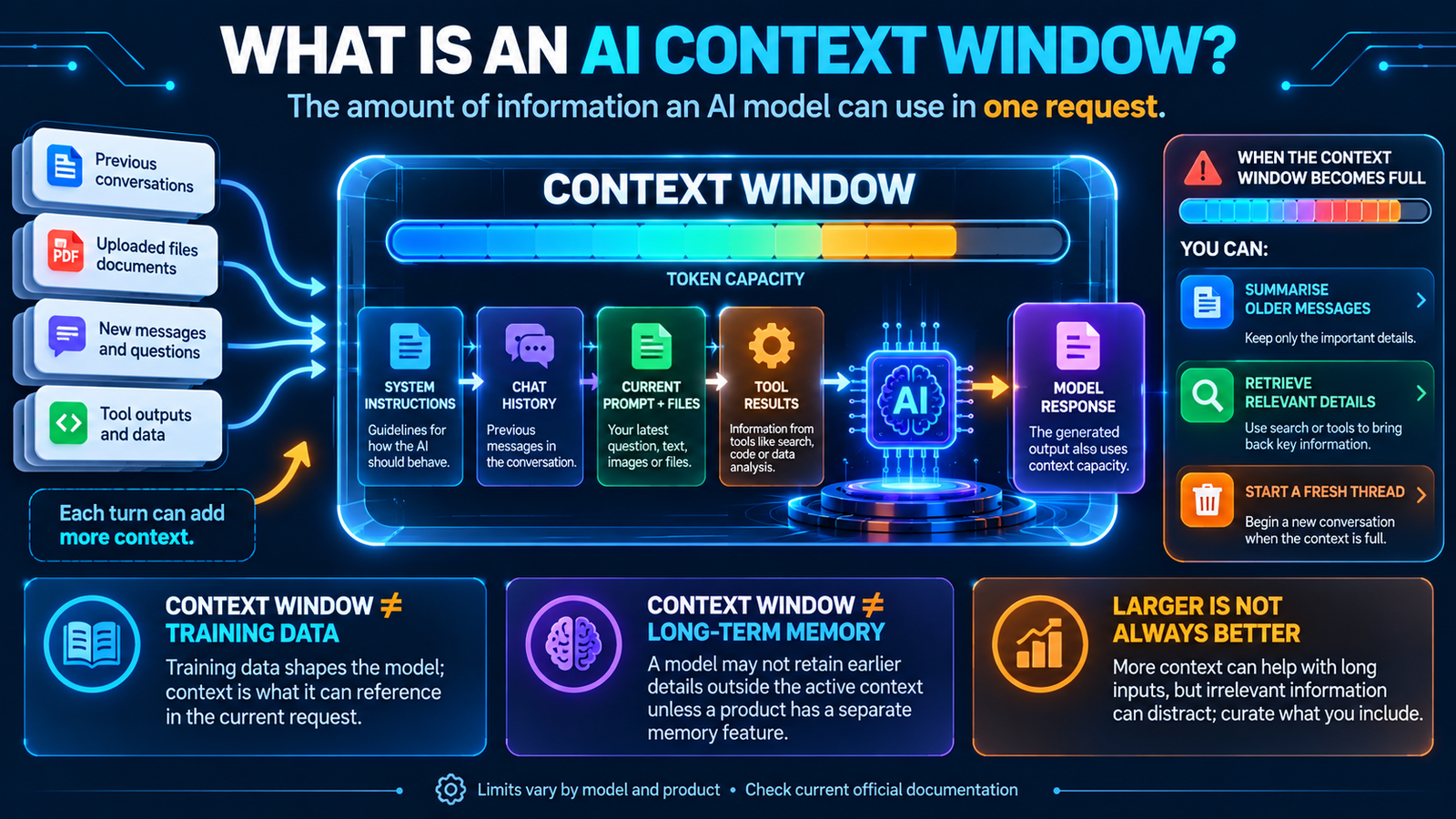
A simplified interaction can include these parts:
- System or application instructions: rules that guide how the model should behave, when applicable.
- Conversation history: earlier user messages and assistant responses that the product chooses to include.
- Your current prompt: the latest question, task, or instruction.
- Reference material: text from uploaded documents, retrieved passages, images, or other supported inputs.
- Tool information: search results, code outputs, database responses, or other tool results when the system uses tools.
- Generated output: the response being produced. In many API designs, output tokens and sometimes reasoning tokens also count against the context budget.
The exact accounting depends on the provider, model, and product. OpenAI describes a context window as the maximum number of tokens used in a request, including input and output tokens and, for some models, reasoning tokens. Anthropic’s documentation also explains that system instructions, messages, tool results, images, documents, tool definitions, and generated output can all contribute to context usage. See the official guides from OpenAI and Anthropic.
AI context window explained visually
The infographic below shows the kinds of information that may enter a context window, how a response uses the available capacity, and some ways an application can manage a long conversation.
What counts toward an AI model’s context window?
It depends on the model and application, but context usage can include several components beyond the latest question. A long conversation may consume capacity even when your newest message is short, because earlier content may still be included.
| Context component | What it can contain | Why it matters |
|---|---|---|
| Instructions | System or developer instructions and formatting requirements. | These guide the model but can use part of the available context. |
| Conversation history | Earlier questions, answers, and messages selected for the current turn. | Long chats can accumulate tokens over time. |
| Current prompt | Your latest question, task, or detailed instructions. | Complex prompts can use a significant portion of the input budget. |
| Files and reference content | Text extracted from documents, code, retrieved passages, or other supported inputs. | Large documents may need to be shortened, split, or searched selectively. |
| Images, audio, and video | Visual or audio content processed by a multimodal model. | Non-text inputs can use model-specific token or representation budgets. |
| Tool results | Search results, database records, code outputs, and API responses. | Tool-heavy workflows can add substantial context. |
| Generated response | The answer produced by the model. | Output capacity may share the context budget or be governed by an additional output limit. |
Do not assume that every product accounts for every item in exactly the same way. For example, image and audio inputs can be processed differently from plain text, and some applications manage conversation history automatically. Check the documentation for the specific model or API when exact limits matter.
What happens when an AI context window becomes full?
When a request approaches or exceeds the available context capacity, the system may not be able to include all the information you wanted to provide. What happens next depends on the product.
- The request may be rejected: an API can return an error if the input is too large for the model’s limit.
- The response may be limited: less space may remain for the model to generate a long answer.
- Older conversation may be removed: some chat products use a rolling history and stop including older turns.
- Earlier content may be summarised: a system can compress previous messages into a shorter summary before continuing.
- Relevant content may be retrieved: an application can search a larger collection and add only the useful passages to the current request.
Some products perform context management automatically; others require the developer or user to shorten the prompt, start a new conversation, or use retrieval. A full context window does not necessarily mean all saved chat history is deleted. It means the system has reached a limit on what it can actively process in the current request.
What is the difference between a context window and memory?
A context window is the information available to the model for a particular request; memory is a separate product or system feature that may store or retrieve information across interactions. A model does not automatically retain every detail just because it appeared earlier in a conversation.
For example, a chat application might include the last several messages in the active context. It might also provide a separate memory feature that stores selected preferences or facts and brings them into later conversations. The memory feature is not the same thing as the model’s token capacity.
| Term | Meaning | Simple example |
|---|---|---|
| Context window | Information the model can reference while handling a request. | Current instructions, included chat history, a document, and the generated answer. |
| Memory feature | A separate product or application mechanism that may retain selected information between sessions. | A saved preference that an assistant retrieves in a later chat. |
| Conversation history | Stored records of previous messages, which may or may not all be included in the active context. | A chat transcript visible in the conversation list. |
| Training data | Data used during model development to adjust model parameters. | Text, images, or other examples used in a model’s training process. |
These concepts can work together, but they are not interchangeable. A product may have long-term history or memory while still using only a selected portion of information in each model request. For more background, read What Is a Large Language Model?
What is the difference between a context window and training data?
Training data is used to develop a model before it is deployed. During training, the model adjusts its parameters based on examples and a learning objective. The context window is used later, when the model receives a request and generates an answer.
Think of training data as part of how the model was built, and context as the material it can refer to for the current task. Adding a document to a prompt does not automatically retrain the model or permanently add the document to its knowledge. The document may simply be included in the current request or made available through a retrieval system.
Is a larger AI context window always better?
No. A larger context window can make it possible to provide more information at once, but it does not guarantee that the model will remember, understand, or correctly use every detail. Very long inputs may contain irrelevant, repeated, or conflicting information. Some models can also become less reliable at locating a relevant detail when it is buried in a long context.
Anthropic discusses this challenge as “context rot”: as the amount of context grows, recall and accuracy can degrade for some tasks. The practical lesson is to curate context rather than simply maximise its length. Put the most important instructions and facts where they are easy to identify, remove irrelevant material, and retrieve relevant passages when needed. See Anthropic’s context-window guidance.
A smaller, well-organised context can sometimes be more useful than a much larger collection of unrelated content. Test the actual model and workflow instead of assuming that the largest available window is automatically the best choice.
What is the difference between a context window and an output limit?
A context window describes the total information a model can use in a request, while an output limit controls how much the model is allowed to generate in its response. These limits are related but are not always identical.
Some APIs define a combined context budget for input and output, while also setting a separate maximum output-token limit. Other products may expose distinct input and output budgets. A request can fit within the context window but still hit the output limit if the answer is too long.
| Limit | What it controls | What you may notice |
|---|---|---|
| Context window | How much information can be used in a request, according to that model’s rules. | Long prompts or histories may need to be shortened or managed. |
| Maximum output tokens | How long the generated response can be. | The answer may stop before every requested point is covered. |
| Rate limit | How frequently or how much you can call a service during a time period. | You may need to wait or reduce request frequency. |
| Usage or billing limit | Your plan’s allowance, credits, or cost budget. | You may reach a subscription or spending limit even when the prompt is small. |
Provider documentation is the best source for exact rules. OpenAI’s conversation-state guide explains input, output, and reasoning tokens in context management. Google’s Gemini token documentation explains how token limits vary by model and how to count tokens for a request.
How do context windows affect long conversations?
In a long AI conversation, each new turn can add more information. If the product keeps sending the full history, the request can grow until it approaches the context limit. A system may then remove or summarise older turns, or the user may need to start a new thread.
This is why an assistant may not be able to use every detail from a conversation that has continued for a long time. The product may only include a selected portion of the history, and details that were removed or summarised may no longer be available in their original form.
For a long-running project, keep a concise project brief with the key goals, decisions, names, dates, constraints, and current status. Update the brief as the project changes. This is often more reliable than expecting an AI system to preserve every detail of a long transcript in its active context.
How can AI applications manage context windows?
Developers use several approaches to keep relevant information available while controlling context size.
1. Summarisation and compaction
Summarisation turns earlier conversation or documents into a shorter version. Context compaction is a more structured process that compresses a long interaction into a smaller representation, ideally preserving the information needed for future steps.
A useful summary should retain decisions, constraints, unresolved questions, key facts, and important references. It should not quietly turn uncertain statements into facts or omit exceptions that affect the task.
2. Retrieval-augmented generation (RAG)
Retrieval-augmented generation, or RAG, allows an application to search a larger knowledge collection and insert relevant passages into the current prompt. Instead of placing an entire library of documents in the context window, the system retrieves a smaller set of relevant content for the current question.
RAG does not remove context limits. Retrieved passages still use context capacity, and the system can retrieve irrelevant or incomplete information. Learn more in our guide to large language models.
3. Selective conversation history
An application may include recent turns, important older messages, or a summary rather than replaying the entire conversation on every request. This can reduce repeated information while preserving the relevant parts of the interaction.
4. Structured prompts
Clear headings, compact instructions, labelled sections, and concise reference material can make a request easier to manage. Structured content also helps developers identify which information is essential and which can be retrieved only when required.
5. Tool-based retrieval
Agents and assistants can use search, databases, code tools, or document systems to fetch specific details when needed. Tool results can improve access to external information, but those results may also consume tokens and must be checked for relevance and reliability.
How can you use a context window more effectively?
Whether you are using an AI chatbot or building an API application, these practical habits can help.
- Start with the goal: explain exactly what you want the model to do before adding background details.
- Include relevant context: provide the facts, examples, files, or constraints that directly affect the answer.
- Remove repetition: avoid copying the same instructions or source material multiple times.
- Prioritise critical details: clearly label non-negotiable requirements, dates, definitions, and exceptions.
- Split very large tasks: process a large report in sections and keep a verified running summary.
- Use retrieval for large libraries: search for relevant passages rather than pasting every document into the prompt.
- Ask for a compact handover summary: for a long project, preserve decisions, open tasks, and next steps before starting a fresh thread.
- Check model-specific limits: use the provider’s current documentation and token-counting tools instead of relying on generic estimates.
- Verify important facts: a detail being present in context does not guarantee that the model will interpret it correctly.
How do you check a model’s context window size?
There is no single context-window size that applies to every AI model. Limits vary by model, API, product plan, and sometimes by the way a feature is used. They also change as providers release new models or update products.
To check a specific system:
- Identify the exact model: do not rely only on the product or chatbot name.
- Open the provider’s official model documentation: look for context window, input token limit, and maximum output tokens.
- Check the API or product mode: a chat interface, API endpoint, coding agent, and enterprise plan may have different limits or context-management features.
- Use a token-counting method: estimate or count the actual request using the provider’s tools where available.
- Recheck before deployment: model limits and pricing can change; record the model version and date used in your implementation.
For current details, consult OpenAI’s context-management documentation, Anthropic’s context-window guide, and Google’s Gemini token guide. Avoid copying a context-size number from an older article without checking the current model specification.
Frequently asked questions about AI context windows
What is a context window in AI in one sentence?
A context window is the limited amount of token-based information an AI model can use as context while processing a request and generating a response.
Is a context window the same as memory?
No. A context window is the active information available for a request. A product’s memory feature is separate and may store or retrieve selected information across conversations.
Does the AI response use the context window?
In many API designs, generated output tokens count toward the context budget, alongside input tokens and sometimes reasoning tokens. Exact accounting differs by provider and model, so check the relevant documentation.
What happens when the context window is full?
The application may reject an oversized request, limit the output, remove older conversation turns, summarise earlier content, or retrieve only relevant material. The behaviour depends on the product and model.
Does a bigger context window make an AI model smarter?
Not automatically. A larger window allows more information to be included, but it does not guarantee better reasoning, recall, or accuracy. The quality and relevance of the supplied context still matter.
Can an AI model remember an entire long conversation?
Not necessarily. A chat product may store the transcript, but it may include only some messages in the active context or summarise older turns. Stored history and active context are different things.
What is context rot?
Context rot is a term used to describe how a model’s accuracy or ability to retrieve relevant details can degrade as the context becomes longer or more cluttered. It is one reason to organise and curate information instead of adding everything indiscriminately.
Are context windows measured in words or tokens?
They are generally measured in tokens. A token can be a whole word, part of a word, punctuation, or another model-specific unit, so word count is only a rough guide. Read our article about what tokens in AI are.
Do images and files use context?
They can. Multimodal models may process images, audio, video, and documents using model-specific representations or token accounting. The amount depends on the model, input format, and provider.
Final thoughts: make context useful, not just large
A context window defines how much information an AI model can actively use for a request. It may include instructions, conversation history, prompts, documents, images, tool results, and generated output, depending on the system. It is not the same as training data, stored chat history, or a separate memory feature.
A larger context window can help with lengthy tasks, but effective context management still matters. Keep critical information clear, remove irrelevant repetition, summarise long conversations, and use retrieval when working with large collections of documents. Most importantly, check the current documentation for the exact model you use because context limits and accounting rules vary.
Continue learning with our guides to AI tokens, large language models, and retrieval-augmented generation (RAG).
Official sources and further reading
- OpenAI: Conversation state and context-window management
- Anthropic: Context windows
- Google AI for Developers: Understand and count tokens
- Anthropic: Prompt caching
Editorial note: Context limits and accounting rules are model- and product-specific and can change. This guide explains general concepts; always check current provider documentation before estimating capacity, cost, or API behaviour.