
Artificial intelligence (AI) is the technology behind many tools people use every day—from recommendations on streaming services to voice assistants, navigation apps, spam filters, and chatbots that can draft text or answer questions. You do not need a technical background to understand the basics. This guide explains what AI means, how it works at a high level, where you may encounter it, and what to keep in mind when using it.
In simple terms: artificial intelligence is a broad area of computing focused on systems that use data and computational methods to produce outputs such as predictions, recommendations, generated content, or decisions. The OECD’s definition also recognises that AI systems can vary in how independently they operate and how they adapt after deployment. Read the OECD overview of its AI-system definition for the formal context.
If you are new to this subject, you may also find our guides to AI tools for beginners and choosing AI tools that actually help useful after this introduction.
What is artificial intelligence?
Artificial intelligence, usually shortened to AI, refers to a range of methods used to build computer systems that can perform tasks associated with abilities such as recognising patterns, understanding language, making predictions, generating content, or supporting decisions. The term covers many different approaches rather than one single technology.
For example, an email service may use AI to identify possible spam, a map app may estimate travel times, and a writing assistant may suggest a clearer sentence. These applications are quite different, but each uses computational models to interpret inputs and produce an output that helps with a particular task.
AI should not automatically be treated as human-like thinking. A system can perform a task impressively without having human experiences, intentions, or a complete understanding of the world. Its abilities and limitations depend on how it was built, the data and methods used, and the environment in which it operates.
How does artificial intelligence work?
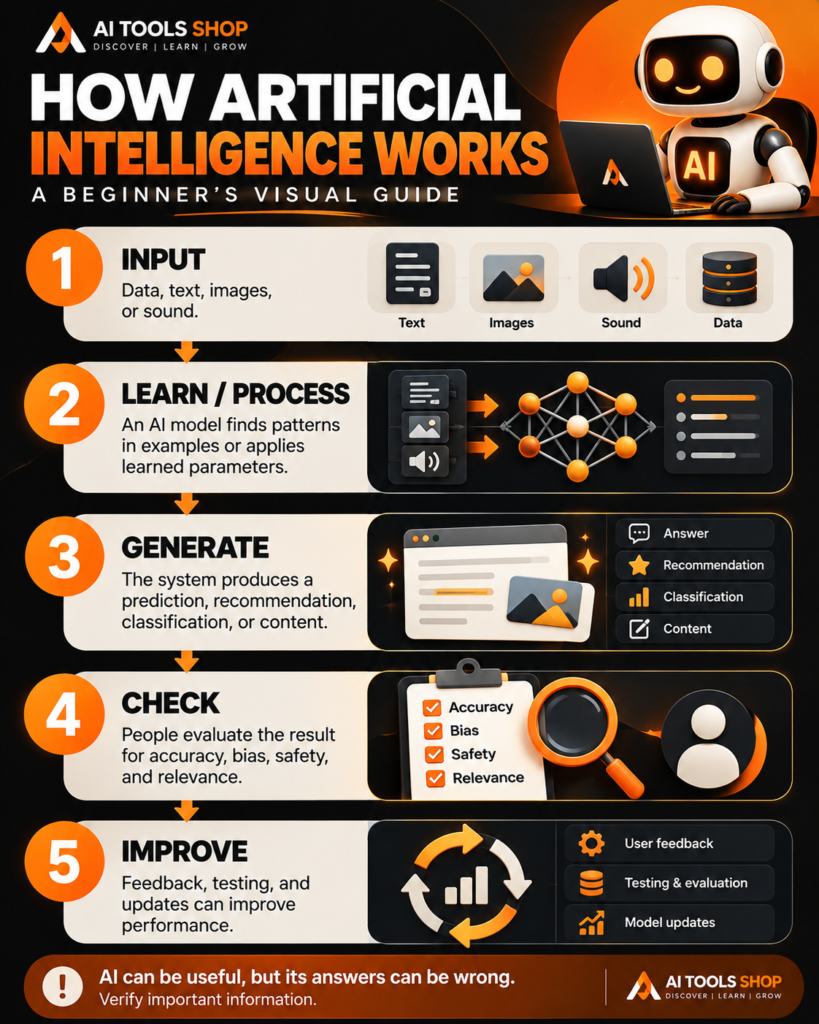
There is no single workflow for every AI system, but a simplified example is: information goes in, a model processes it, and the system produces an output. The model may have been trained on examples, programmed with rules, or built using a combination of techniques. Some systems can also use feedback, testing, or updated data to improve how they perform.
- 1. Input: The system receives information such as text, images, audio, sensor readings, or other data.
- 2. Processing: Algorithms and a model analyse the input, applying learned patterns or programmed logic.
- 3. Output: The system produces a result, such as a prediction, classification, recommendation, response, or generated image.
- 4. Evaluation: Developers or users assess whether the result is accurate, useful, safe, and appropriate for the task.
- 5. Improvement: Depending on the system, developers may use evaluation, new data, user feedback, or model updates to improve future performance.
This is a teaching model, not a rule that every AI tool follows exactly. Some systems operate in real time, some use several models, and some are updated only through a separate development process. The OECD provides an accessible overview of how AI systems can perceive inputs, interpret them, and act or recommend actions in its guide to how artificial intelligence works.
How artificial intelligence works: visual guide
Use this infographic as a quick visual summary. It shows a simplified flow from input data to processing, output, checking, and ongoing improvement.
What are the main types of AI?
People use the phrase “types of AI” to describe different things. One common distinction is between AI systems designed for specific tasks and the hypothetical idea of a broadly capable system that can learn and reason across many domains. Another distinction is based on the techniques used to build an AI system.
Narrow or task-specific AI
Narrow AI is designed or trained to perform particular tasks, such as identifying objects in images, recommending videos, translating text, detecting suspicious transactions, or answering questions within a tool’s capabilities. Most AI applications people use today are built for defined tasks or sets of tasks, and they can perform poorly outside the situations they handle well.
Artificial general intelligence (AGI)
Artificial general intelligence, or AGI, is commonly used to describe a potential kind of AI with broad capabilities across many different tasks. There is no universally agreed practical test that settles every debate about AGI, and current products should not be assumed to have achieved it simply because they can generate fluent responses or solve difficult problems.
Machine learning
Machine learning is a major approach within AI. Instead of relying only on hand-written rules, machine-learning methods use data to fit models that can identify patterns and produce outputs. For example, a model may learn to classify images from many labelled examples or estimate future demand using historical information.
Deep learning
Deep learning is a branch of machine learning that uses neural networks with multiple processing layers. It has contributed to advances in image recognition, speech technology, language systems, and generative AI. It is not the only way to build AI, and not every AI application uses deep learning.
Generative AI
Generative AI produces new outputs—such as text, images, audio, video, or code—based on patterns learned during training and the instructions or inputs it receives. AI chat assistants and image generators are familiar examples. Generated content can be useful, but it can also contain errors or resemble existing material, so review it before using or publishing it.
Everyday examples of artificial intelligence
You may already interact with AI without thinking about it. Common examples include:
- Search and recommendations: systems help rank results or suggest content based on signals and patterns.
- Email filtering: classifiers help identify spam, suspicious messages, and unwanted content.
- Maps and transport: prediction systems can estimate travel time or help analyse traffic patterns.
- Voice assistants and speech tools: AI can help recognise spoken words, convert speech to text, or respond to commands.
- Translation: language models can help convert text from one language to another.
- Photo and video apps: AI can detect subjects, improve images, generate captions, or help edit media.
- Customer support: chatbots can answer common questions or route a request to the right team.
- Writing and productivity: assistants can help brainstorm, summarise, draft, and organise information.
These applications differ in their data, design, and consequences. A recommendation is not the same as an automated decision that affects a person’s finances, access to services, or health. The amount of testing and human oversight required should match the task and its risks.
What are the benefits of AI?
When designed and used appropriately, AI can help people process large amounts of information, automate repetitive steps, identify patterns, generate first drafts, and make some workflows more accessible. It may also support experts by highlighting information that deserves closer attention.
For a small business, an AI assistant might help brainstorm social media ideas or organise customer questions. For a student, it might explain a difficult topic or create practice questions. For a developer, it might suggest code or help interpret an error. In each case, the user still needs to decide whether the result is correct and appropriate.
What are the limitations and risks of AI?
AI systems are not automatically accurate, fair, private, or safe. Their weaknesses depend on the task and the way they are built and deployed. Common risks include:
- Incorrect outputs: a system can produce a convincing answer that is incomplete or wrong.
- Bias: data and design choices can lead to unfair or uneven results for different people or groups.
- Privacy concerns: entering confidential or personal information into a service may create risks, depending on the provider’s settings and terms.
- Security and misuse: AI can be used to assist scams, impersonation, spam, or other harmful activity.
- Overreliance: trusting a tool without review can lead to poor decisions or the spread of misinformation.
- Cost and environmental impact: building and operating AI systems requires computing resources, infrastructure, and energy.
For important decisions, use reliable sources, check the system’s limitations, protect sensitive data, and involve qualified people where appropriate. The US National Institute of Standards and Technology (NIST) maintains a glossary and resources for understanding AI terminology and risk; see its artificial intelligence definition and references.
How can beginners start learning AI?
You do not have to begin with advanced mathematics or programming. A practical learning path is to understand the basic vocabulary, try a few tools on everyday tasks, and learn to evaluate the outputs critically.
- Start with the fundamentals: learn what AI, machine learning, deep learning, and generative AI mean.
- Try one tool: choose a chat assistant or creative tool and experiment with a low-risk task.
- Practise giving instructions: state the task, context, desired format, and constraints.
- Verify what matters: check factual answers against primary or authoritative sources.
- Explore different applications: try writing, research, image generation, or simple data tasks depending on your interest.
- Learn privacy basics: understand the data settings and avoid submitting information you should keep confidential.
For next steps, visit our guides to the best AI tools for beginners and making AI work for you.
Frequently asked questions about AI
Is AI the same as machine learning?
No. Artificial intelligence is the broader field. Machine learning is one approach within AI that uses data to train models to identify patterns and produce outputs.
Does AI think like a human?
Not necessarily. AI can perform tasks associated with language, perception, prediction, or problem-solving, but a successful output does not demonstrate that a system has human-like understanding, consciousness, or intentions.
What is generative AI?
Generative AI is a type of AI that creates outputs such as text, images, audio, video, or code in response to inputs. The result should be reviewed because generated material can be inaccurate or unsuitable.
Can beginners use AI without coding?
Yes. Many AI tools have interfaces that let users ask questions, upload supported files, or create content through everyday language. Coding can be helpful for building more advanced systems, but it is not required to try many common AI applications.
Is AI always accurate?
No. AI systems can produce errors, reflect bias, or fail when a task differs from what they handle well. Check important claims and do not rely on an AI output alone for high-stakes decisions.
Final thoughts
Artificial intelligence is a broad set of technologies that can recognise patterns, make predictions, support decisions, and generate content. It already appears in many everyday tools, but its capabilities vary and its outputs need appropriate review.
The best way to begin is to stay curious, practise with simple tasks, and learn both what AI can do and where it can fail. Keep exploring AI Tools Shop for practical guides, tool explainers, and beginner-friendly tutorials.
Official sources and further reading
- OECD: Updated definition of an AI system
- OECD: How artificial intelligence works
- NIST: Artificial intelligence glossary
- IBM: What is artificial intelligence?
Editorial note: This article is an introductory overview. AI techniques and applications differ, and important claims should be checked against authoritative sources. No hands-on AI performance tests are claimed in this guide.